Listing QC for cross-border sellers
Catch it before you publish, keep your account safe
VanillaX Box checks your product detail page against the rules of the country and marketplace you sell on. It flags spec violations, prohibited claims, rights risk, missing information and image quality, then applies the fixes you approve and re-inspects.
- No card required
- Shoot and upload from your phone
- About 3 minutes per inspection
Radiance Boost Serum 30ml
Amazon · United States · main image

- 18 countries
- Country disclosure rules
- 15 marketplaces
- Platform listing specs
- 5 categories
- Inspection verdict types
Remove rejection reasons up front
We inspect with the same rules a marketplace reviewer uses, and fix what can be fixed automatically.
Country and platform rules applied automatically
Choose where you sell and the image specs, prohibited claim lists and country-specific disclosures load themselves. No rulebook to memorise.
Five verdict categories
Spec violations, prohibited or risky expressions, rights risk, missing required information and image quality — each with a severity and a priority.
Before and after, then auto-fix
Compare every suggestion side by side and apply only what you approve. Aspect correction, white background, claim rewriting — then an automatic re-inspection.
Final images and reports
Download marketplace-ready images and the inspection report. Versions and download history stay on record.
Built for the phone
Shoot the detail page with your camera, upload it, review findings and approve fixes without opening a laptop.
Team access and API
Per-customer API keys, usage metering and roles. Drop inspection straight into the listing tools you already use.
Agent-ready API
Built so a coding agent can wire it up on the first try
Claude Code, Codex and Gemini Antigravity should not have to guess. We publish a machine-readable guide that spells out what to call, in what order, and what to do with the answer — so integration starts from one line in a prompt.
- Three ordered workflows: inspect-and-fix, pre-publish gate, catalogue audit
- The scoring formula with category and severity definitions
- Ready-to-run curl, TypeScript and Python samples
- Explicit guardrails on what an agent should never do
Agent manifest (JSON)
Endpoints, auth, the verdict model, workflows, example code and guardrails in a single file.
Paste this into your agent
Give it the manifest URL; it reads the rest and plans the calls itself.
Use VanillaX Box to inspect my product listing. The machine-readable API guide is at https://dodam-ai.vercel.app/api/v1/agent-manifest.json. Read it, load the rules for my market, inspect the images and copy, then apply only the auto-fixable findings.
 Claude CodeTerminal and IDE agent
 CodexOpenAI coding agent
 Gemini AntigravityGoogle agent IDE
How an inspection runs
Pick a market, upload the detail page, and follow one flow through verdicts, fixes and the final images and report.
What a verdict looks like
Score and seal, findings by category, evidence and suggested fixes — all on one screen.

Vitamin C Serum 30ml Acne Cure Whitening Ampoule
Amazon · United States · 2 images · Round 1
Inspecting…
10 findings
By category- Spec3
- Expression5
- Rights0
- Required info2
- Quality0
Taken from the real inspection screen.
Real inspections, before and after
See how the same product photo scores once it matches the marketplace rules. Every score and finding below is produced by the inspection engine from these exact images.
LUMIERE Radiance Boost Serum 30ml
Amazon · United States

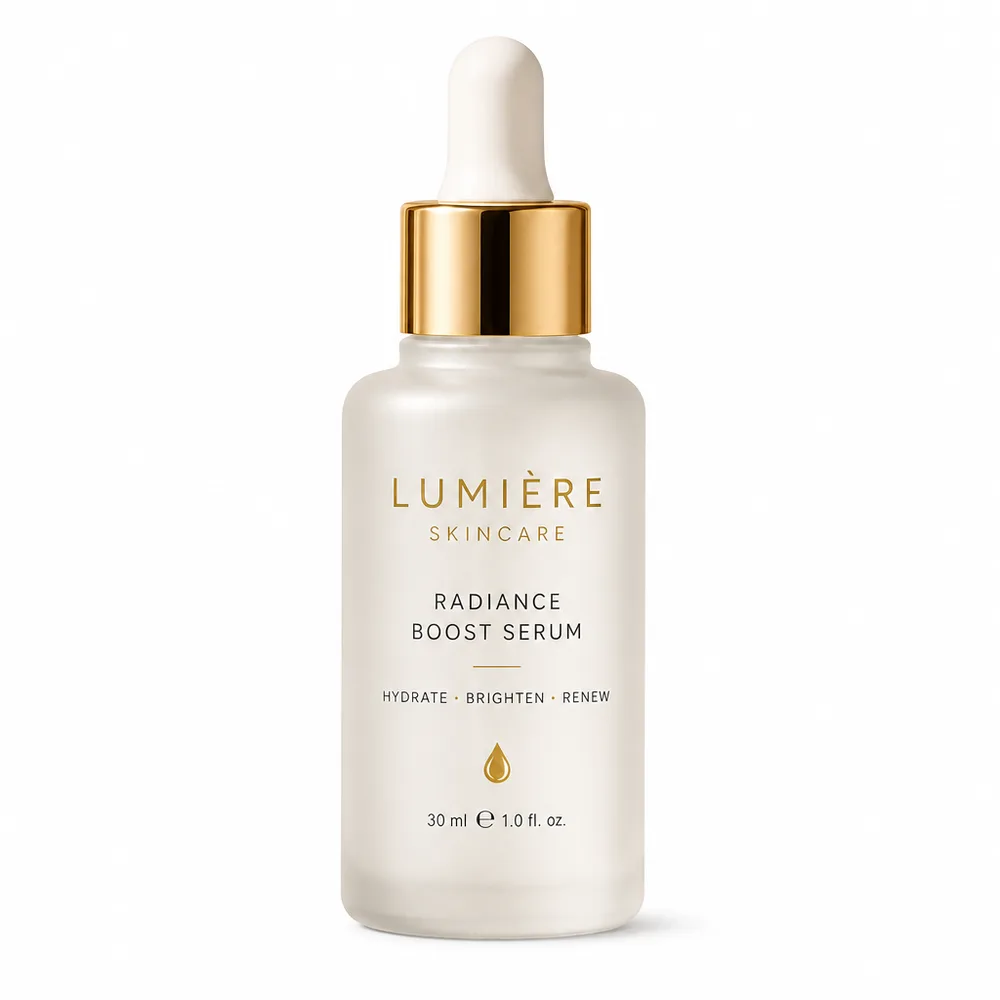
Before
84
Needs fixAfter
99
PassFindings
- CriticalSpecMain image background is not pure white0% white border
- InfoSpecBelow recommended size for zoom1024 × 1024 px
Drag the handle to compare. Example photographs were generated for this product tour.
Marketplaces and countries
The same product is judged differently in each market. VanillaX Box applies the rules for every combination.
Sales platforms
 CoupangKorean product notices and Coupang API listing specs
 Naver Smart StoreKorean product notices and Naver listing guidance
- AmazonStrict image spec, white background, claim rules
 ShopeeSquare images, local-language required info
 LazadaSquare images, watermark and claim restrictions
 TikTok ShopShort titles, strict prohibited claims
 RakutenJapanese labeling and 特定商取引法 info
 Qoo10Popular with K-beauty sellers
 Tmall GlobalCross-border China, advertising law limits
- JD WorldwideJD WorldwideCross-border China marketplace
 noonArabic labeling, GCC compliance
 eBayFlexible spec, IP policy enforcement
 Walmart MarketplaceStrict image and content standards
 TemuSemi-managed cross-border
 Shopify (own store)Your own storefront, country rules only
Target countries
- South Korea
- United States
- United Kingdom
- Germany
- France
- Japan
- China
- Taiwan
- Hong Kong
- Singapore
- Malaysia
- Thailand
- Vietnam
- Indonesia
- Philippines
- Australia
- United Arab Emirates
- Saudi Arabia

















Marketplace logos and flags belong to their owners and are shown only to indicate supported markets.
Frequently asked questions
Anything else? Write to admin@vanillax.co.
What does VanillaX Box inspect?
It checks a product detail page against the rules of the country and marketplace you pick: image spec (size, ratio, format, background, file size), prohibited and risky expressions, brand and intellectual-property risk, country-specific required information, and image quality. Every finding is one of five categories.
Which marketplaces are supported?
Amazon, Shopee, Lazada, TikTok Shop, Rakuten, Qoo10, Tmall Global, JD Worldwide, noon, eBay, Walmart, Temu and your own Shopify store, across the United States, United Kingdom, Germany, France, Japan, China, Taiwan, Hong Kong, Singapore, Malaysia, Thailand, Vietnam, Indonesia, the Philippines, Australia, the United Arab Emirates and Saudi Arabia.
How is the score calculated?
Start at 100 and subtract 15 for each critical finding, 5 for each warning and 1 for each note. 85 or above with no critical finding is a pass, 60 to 84 or any critical finding needs fixing, and below 60 fails.
Are fixes applied automatically?
Only after you approve them. Auto-fixable findings show a before and after comparison; approved fixes resize or pad images, whiten the background, convert the format, compress the file, strip metadata, replace risky wording and add missing required information. The listing is then re-inspected as a new round.
Is there an API?
Yes. Create an API key in Settings and call the REST API with a Bearer token to create inspections, read findings, apply fixes, re-inspect and download outputs. An OpenAPI document is published.
Does it work on a phone?
It is built mobile first. You can photograph a detail page with the phone camera, upload it, review findings and approve fixes without leaving your phone.
Start with the page you are about to publish
Signing up and running the first inspection takes about three minutes. No card required.